Showing posts with label Notebook. Show all posts

May 24, 2011

NVIDIA Optimus for Linux


Have you heard about Optimus NVIDIA technology? The technology to allow notebooks with Intel chips and NVIDIA graphics cards to exchange automatically as needed. If you need a process of computing with a high graphic level, then the system will automatically work with graphics cards using NVIDIA. However, if you only need a lightweight computing activities, the system will use a graphics chip from Intel alone. The advantages of this technology is the survival of the notebook, if only to survive using the batteries, will become longer. Want to know more about the technology? Please read our previous article "NVIDIA Optimus Review: Life Be More Easily". 

What are the weaknesses of this Optimus NVIDIA technology? Technology can not be run on operating systems other than Windows. However, it is about to change. There are some developers who are currently trying to run the technology on the Linux operating system! Currently, the developers are working on Bumblebee, an open source that will realize the dream of notebook users with the Linux operating system. The developers are being sought for NVIDIA Optimus work in Ubuntu, Debian, OpenSUSE, Fedora, and Arch Linux. For the future, the list will be added again by these developers. Such information we collect through liliputing.com. 

This information is enough to bring fresh air for users of notebooks with the Linux operating system because they can choose to use Intel or NVIDIA graphics. Much remains to be repaired because Bumblebee is still not complete as Optimus, such as switching graphics automatically, yet has a list of games, and any application that can use the NVIDIA GPU. However, in our opinion, only a matter of time until finally 'Bumblebee' will be as strong as Optimus.

NVIDIA Optimus Review : Life Be More Easily


What is this technology? Is NVIDIA managed to obtain technology from the Transformers? Haha, of course it is only imaginary. However, NVIDIA has to offer with Optimus technology is indeed like a dream notebook users.

In short, with Optimus, notebook users do not need to bother when I had to choose: a notebook with fast graphics system but poor battery endurance, or a notebook with integrated graphics system (the famous are less able to play heavy graphic content) but with good battery life.

Why would NVIDIA need to bother to create this technology? The answer is because need for this technology is very high. The main cause is due to the high number of notebook users today. According to Gartner, the growth of notebooks have surpassed desktops, ranging from 2009.Tren this year will only be increasing in the future.


Requirements : Battery life and performance

Notebook computers are portable and can be used without the need to search your electric outlet. Both these important points to note. For portability, the notebook should be quite mild. To be able to work anywhere, the notebook should have a good battery life. Power adapter is one of the extra burden when you carry the notebook. So, a good notebook should be able to carry without requiring a power adapter. This means the battery resistance should be very good.

Performance is a critical requirement. Failure to satisfy netbook users in its first year attendance is proof positive. Netbooks do not have enough performance to run many applications that are important. In fact, running a YouTube video with HD resolution of course, been very hard done by netbooks. In the end, the trend again turned to a more powerful notebook.


So far, notebook with additional graphics system (discrete graphics) are always faced with a problem. The battery resistance is generally bad. This is because notebooks have to supply extra power to the graphics system (VGA) that powerful. In fact, the graphics system is not always working at maximum capacity. Thus, power supplied to the graphics system tends to be wasted.

Meanwhile, a notebook with integrated graphics system (such as Intel HD Intel 4500MHD or graphics on i3, i5, and i7) has a tendency durable good battery. However, this system has a graphics capability that is sometimes inadequate. For example, to play 3D games, integrated graphics system is generally difficult to run smoothly. At the time of playback HD movies (especially Full HD 1080p MKV format), integrated graphics system will be quite overwhelmed. It is not capable, but all systems would work hard until the system response becomes impaired just because running the full HD movie. Want to try to convert some movies while playing a 1080p Full HD movies? This system is certainly not the right choice for these needs.

Switchable Graphics: the right solution?

Looking at the above conditions, you may think, "why not make a notebook that has two graphics systems and allow users to choose the graphics system which is needed?"This is done several notebook vendors. Notebooks with Intel Core i3/i5/i7 who have integrated graphics system combined with discrete graphics system. Users are free to choose the graphics system where needed.

The problem is, there are still many users who do not know how to do the switching between two graphics systems. For those who know how, there are still problems with human negligence that often forget to do the switching. Suddenly, the notebook was running out of battery in the middle of a presentation, as users forgetperform switch to integrated graphics system more efficient power.

Another problem that arises is the method of switching itself. In the early stages, the switching method still requires the user to restart the notebook. While the last method, although the notebook does not need to be restarted, users are still faced with the problem when there are few applications that are "holding" the graphics system to refrain from switching ( eg,browser ). This makes you have to turn off the application first, can do the switching.

May 11, 2011

Review Netbook Asus VX6 Lamborghini


Some time ago, Asus launches a netbook called VX6 Lamborghini. You wonder why Asus add-frills word "Lamborghini" at the end of this series? Apparently Asus is working with the Italian automotive manufacturer to design this netbook. Actually, the number of notebook manufacturers are working with automotive manufacturers can still be counted on the fingers. However, if the two companies work together, surely they can produce a product other than normal, like this Lamborghini VX6.


Asus VX6  Lamborghini comes in the form of charming. This product is designed specifically with forms that adopt or incorporate elements of the famous Lamborghini car. The side of this netbook uses aluminum finishing doff. Not only found at the side of the course, this alumium line connects to the inside with the power button and express gate on the left and right. Finishing makes this netbook looks very solid. Asus VX6 offered in black and white with piano finishing. In addition, the symbol of the pride of the Lamborghini, the Bull of gold, also appear to adorn this product. If seen at a glance, this netbook product is very similar to the super car.


A netbook products are usually equipped with a screen size of 10 inches. However, Asus VX6 Lamborghini is trying to be different by using a screen measuring 12 inches. The screen has a resolution of 1366 × 768, of course, can increase the value of ergonomic screen so your eyes will become more comfortable when using this netbook. Netbook Asus Lamborghini VX6 using D525 with an Intel Atom 1.8GHz speed and 3GB of DDR3 memory as the main engine of this device. Data storage capacity provided relatively large for a netbook, 320GB hard disk ready to use for storing your files in this netbook.


Express gate is also available in this netbook Asus VX6 Lamborghini. To activate this feature you can just press the power button located on the left above the keyboard. Express gate is an operating system that can be used in a matter of under 5 seconds. In the feature, you can do various things, such as browsing, viewing pictures, listening to songs, and so forth. His ability is limited, but when you are pressed for time and must immediately check your e-mail, then the feature is very helpful in Expess Gate.


Use of the Atom processor is equipped with NVIDIA Ion making Asus decided to give a very complete connectivity ports (for a netbook) in VX6 Lamborghini. This netbook is equipped with USB3.0 port in blue to distinguish it with another USB port and comes with an HDMI port. Both these ports you can use to change Asus VX6 Lamborghini become a mini media player products.

Chicklet keyboard model.

The inside of this netbook is not less interesting to the outside. Part hand rest use a combination black finish and aluminum doff doff at the top that also serves as a speaker and power button. When we look at the touchpad, we feel the form is slightly different from similar products. With the aluminum that surrounds it, form a touch pad looks like a vent on the front of the Lamborghini car bumper! Keyboard Asus VX6 Lamborghini very convenient to use because it feels soft, as well as the function of the left and right click buttons. You do not need hands are too powerful to suppress.

Performance

SysMark 2007

Performance of the Atom processor in this product are not much different from our usual type of processors found in netbooks. Results you can definitely see in the chart above. With these results in fact we still do not recommend using this netbook out of context, namely for computing activities by using the application that does not demand high performance. Although AX6 Lamborghini just entering the netbook class, with the use of Ion Asus NVIDIA VX6 can run the movie with full HD1080P with a good resolution.

MobileMark 2007

Survival of this netbook also includes good, Asus VX6 lasted 272 minutes, equivalent to 4 hours with the battery of 5200mAh. In fact, we expect more, but with the use of NVIDIA Ion seems so difficult to achieve.

Transcoding

Use NVIDIA Ion, making the process of transcoding HD movies to various resolutions to walk fast enough compared to a netbook without NVIDIA Ion. Proved that NVIDIA CUDA can run to complete the task this transcoding.

NVIDIA Performance Ion

Ion NVIDIA graphics performance that is used does not allow this notebook to play 3D games well. Based on the results of benchmark 3D Mark 2006, under number 3000, is seen clearly if there are graphics that can not be used to play 3D games with FPS above 30, even with the lowest settings and resolution though. However, arcade games can still run well.

Conclusion

For you fans of the world's automotive and technology, the Asus VX6 Lamborghini seems to reflect your interest in both worlds. We must recognize that the breakthrough made ​​by Asus in creating this product other than in the other. Netbook will also have more value in the presence of USB3.0 and HDMI port. In fact, we expect these mobile devices use processors more powerful and muscular so it can run applications smoothly middle to upper super car like a Lamborghini like when you press the gas pedal until they run out on the freeway.

Excess
  • USB3.0 and HDMI port.
  • Design charming.
  • Screen 12 ".


Deficiency
  • Graphics are embedded less able to play 3D games.
Spesification


May 07, 2011

Notebook MSI U270


Before actually opening the packaging, my eyes got drawn into a logo on the front packaging. I see that this notebook was already equipped with USB3.0 technology! With enthusiasm I saw this part in the sales package. In it I found the unit notebook MSI U270, 5200mAh battery, charger is small and lightweight, power cable and the DVD driver notebook itself. Maybe you wonder, why so simple? The answer is a notebook that we received was the engineering sample.


Specifications listed in the packaging indicates that MSI U270 notebook is using AMD processors Zacate Barazos with E-350 with the graphics on the AMD Radeon HD6310. The capacity of the installed hard disk is 250GB and DDR3 memory that we get is 4GB, quite attractive for memory capacity. Judging from the dimensions, the notebook is quite thin and simple with a screen of 12.1 "with resolution 1366 × 768. Interested in performance and durability provided 5200mAh battery?

April 28, 2011

'Lenovo' Prepare Super Slim Notebook


  The signs of the emergence of Lenovo ThinkPad X1 already beginning to show. Some foreign websites have started to discuss the presence of super-thin notebook from Lenovo that. Like what about the specifications of the ThinkPad X1?

  Lenovo ThinkPad X1 will be equipped with super-thin design. This notebook is rumored to be having a thickness of only 5.21 mm only.


  Lenovo explain that they will apply new technologies for batteries 'ThinkPad X1'. Future, a complete battery ThinkPad X1 will not be directly replaced by the user. Such systems can also be found on Dell Adamo and MacBook Air. The battery will also be equipped with technology RapidCharge. This technology promises to speed the higher charge, up to 2.5X faster than the previous series ThinkPad battery. Lenovo also promises a high battery life. This new battery can make the notebook 3x longer life than a notebook setipe.

  Lenovo ThinkPad X1 will be armed with an Intel Core i5-2520M with a clock speed of 2.5GHz, 160GB SSD, 13.3-inch screen with Gorilla Glass technology that can support resolutions up to 1366 × 768, 8GB RAM, and card reader SDXC.


  Not clear when the Lenovo ThinkPad X1 will launch. However, many predict that notebooks will be priced at about US$2900.

April 27, 2011

Acer Aspire One Happy with New Color


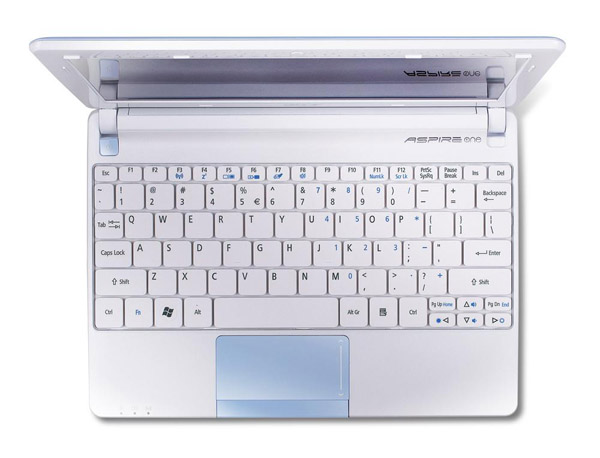
  Stay prioritize color as a charm, Acer Aspire One Happy now comes with new colors that are not less interesting than before. In the new color series, Acer Aspire One Happy to give a touch of a water drop so that makes this notebook look more fresh. Acer Aspire One Happy will be offered with variety Blueberry Shake ,Banana Cream ,Papaya Milk ,and Strawberry Yogurt . We also feel the nuances of Easter Egg in this notebook since its launch not far from the celebration of Easter.


  Future in the Acer Aspire One Happy will be installed Intel Atom N570 processor dual-core processors with speed of 1.66GHz with 2 GB of DDR3 memory as a source of strength. Use of this netbook screen size still using the 10.1 "so that the size and dimensions are no different from before. The size of the hard disk is also quite good because it gives a size of 250 GB. Another completeness is 802.11n WiFi, Bluetooth, and Windows 7 Starter. To ensure the release of these products, the Acer pledged to throw their products in the  future.

April 21, 2011

MSI CX640 and CR640 with Intel i3

MSI CX640 Silver, Black MSI CR640

  'Intel chipset 6-series' previous experience bugs that make the notebook manufacturers have pulled their products ready for sale. However, at this time, improvements have been done by the chipset revision B3 and various armed notebook Intel Sandy Bridge that began to fill the markets that were previously empty. As performed notebook manufacturer MSI is also directly issuing new series, one of which MSI CX640 series and CR640. Both these new series will fill a class aimed at middle class who need a large screen with a power processor that is reliable enough to work and play.
  
  MSI CX640 and CR640 will use an Intel Core I3 2310M as a source of energy which is supported with 4 GB of DDR3 memory. What distinguishes MSI CX640 and CR640? Later, MSI CX640 will use GT 520M NVIDIA GeForce graphics technology with Optimus, whereas CR640 MSI will use the Intel GMA 3000HD graphics. For data storage capacity, will both notebooks will be attached to the hard disk of 500 GB. Other Fittings quite charming is the 2 port USB3.0 that will make data transfer from or to a notebook to an external media USB3, 0 is rapid. The dimensions of both the notebook is quite sizable due to the use of screen at 15.6 ". 

HP EliteBook 8460p: Battery life 32 Hours!


  One of the notebooks that interests us is the EliteBook 8460p. Notebook has the added value of the product the ability to live in a very long time. Just imagine, with the help of an additional battery, the notebook can live for 32 hours without having to plug it into electricity!


  To be able to support the business needs of an increasingly heavy, a businessman must be equipped with a formidable weapon. Hence, the HP EliteBook 8460p complete with specifications that qualified. For the processor, you can choose between Intel Core i3, i5, and i7 Sandy Bridge. For other components, the notebook comes with up to 8 GB of memory, USB 3.0 port, and the AMD Radeon HD 6470M. You can choose between the hard disk with SSD for notebook storage.

  HP claims that EliteBook 8460p can survive for 32 hours without having to plug it into electricity. However, to achieve this capability, you must combine the 90-cell battery, SSD, and additional batteries sold separately from the standard sales package.


  Unfortunately, HP EliteBook 8460p is not widely sold in the market. These products enter the commercial or business class, rather than consumer class. You can easily find a consumer product. However, to get a commercial product, you should contact HP directly. This product is priced from US$999.


April 15, 2011

'Alienware' Prepare 'Notebook' With Display Measuring 14 Inches

  Some time ago, Dell has announced their plans to update the line of Alienware notebooks with second-generation Core processors, Sandy Bridge. Not long ago, Dell has a new plan, that fills a product line that had been empty. Alienware will launch notebooks with screens of 14 inches (M14X).


  Alienware has launched notebook with screens of 11 inches (M11X), 15 inches (M15x), and 17 inches (m17x). For some people, notebooks with screens that are too large or too small. Therefore, Alienware will fill the existing vacuum line with a notebook that has a screen 14 inches. Alienware M14X hope will be a notebook with the right size.

  So far, Alienware known for providing many customization options for enthusiasts. Surely Alienware will apply the same for the M14X. Later enthusiasts can choose between,
  • 250GB up to 750GB HDD with 7200RPM speed.
  • Samsung P810 SSD with a capacity of 256 GB, 2.5 inch, SATA2 or LiteOn / Plextor PX-256M2S SSD, 256GB, 2.5 ", SATA3.
  • 1GB-4GB RAM, DDR3, 1333MHz 2GB and 4GB or DDR3 1600MHz speeds.
  • Intel processor Core i7 i3-2310M to-2820QM.
  • LCD 14-inch Full-HD 1920 × 1080 or 14inci 1366 × 768.

  GT555M 3GB NVIDIA GPU or NVIDIA graphics card other than that not to be named by Alienware.

  Until this story down, Dell is still not willing to provide certainty of price M14X. Dell also still keep the launch date for this notebook. However, if the notebook is already on the market, M14X can be a fitting choice for you gamers. With a size that is not too large and qualified support for the specification, this notebook can be your friend to play games while traveling.

April 13, 2011

Toshiba Notebook without 3D Glasses

  Currently, many notebook manufacturers starting with the 3D technology are found in the market, ranging from Acer, Asus, Dell, Sony, HP, and other major brands. Notebooks with this technology is very interesting because it makes you feel a different sensation when watching movies or playing games on mobile devices. However, you also need to know that the notebook with 3D screen has several weaknesses. First, you are still required to use 3D glasses because the notebook screen using stereoscopic screen with polarized glasses to produce 3D images. Second, the price offered for 3D tech notebook is certainly more expensive than the notebooks in general.

  Those things are behind Toshiba 'screen 3D' without the need for polarized sunglasses. The plan, the notebooks will be launched mid this year. Previously, Toshiba has included this technology in the LCD TV then apply it to the screen notebooks. Hopefully, this technology will be able to generate a 3D mobile device that can generate three-dimensional images are excellent but do not require too high specification.

  However, there is one question that prop up: whether a notebook with 3D display without polarized glasses will be of interest to be purchased? Please wait for the answer to that question when the product actually was officially launched. However, so far, the technology offered by Toshiba this time is the best solution for the future of 3D screens for notebooks.

April 12, 2011

Fujitsu Launches Netbook MeeGo in Indonesia

  Tuesday (12 / 4), Fujitsu PC Asia Pacific is officially introduced its series of Spring 2011. The product is composed of 9 series Lifebook and Esprimo a series. The products were launched in TransForce, Grand Indonesia, Jakarta.

The new Lifebook series consists of Series S (SH761 and SH561), Series P (P771 and PH701), Series A (AH531), Series L (LH701 and LH531), NH Series (NH751), and MH Series (MH330). For Esprimo series, Fujitsu introduced the EH300.

All Lifebook series that was launched has been using Intel Core Generation-2 (Sandy Bridge). Fujitsu's latest notebook market segment dividing it into 3 segments, namely Live, Work, and Play. For Life series, you can choose SH761, SH561, LH531, and EH300. To Work, Fujitsu recommends that you choose P771, PH701, and LH701. For the last series, Play, you can choose between MH330, NH751, and AH531.

Of the many products Lifebook, there is a series that attracted our attention, namely MH330. MH330 is a netbook device equipped with an Intel Atom N455 1.66GHz. Netbook MH330 this feels special because it has an operating system MeeGo. MeeGo an operating system developed by Nokia and Intel. Fujitsu MH330 already available in the Indonesian market and priced at Rp2.799.000, -.

P771 series also attracted the attention of Loserba Review. This notebook uses 12.1-inch screen. For the problem of processor, you can choose between Intel Core i7 i3 and the second generation. Interestingly, this notebook will be equipped dengna 6 cell battery at 6200mAh. The battery is claimed to be able to make this notebook live for 8 hours without having to plug it into electricity. This notebook is priced at USD1538.

Fujitsu Series desktop at launch this time, Esprimo EH300, comes with using AMD Fusion platform Brazos. This product appears in the form of All-in-one PC. This product has also been equipped with a 20-inch screen capable of supporting resolutions up to 1600 × 900. The device also comes with 4 GB memory, 500 GB hard disk, and ATI Mobility Radeon HD6330M.

April 09, 2011

Asus U43Jc Bamboo : Review

Natural bind Technology

  While many notebooks come with metal and plastic materials, this series tries to remind us of nature by incorporating natural elements are more alive. If you've ever noticed the car's interior luxury, consider the part of his dashboard. Usually this section using wood materials for a natural look as well as elegant. Well, touch wood is also manifested in the new Asus notebook series U43Jc included in the Bamboo series. In this case bamboo material used to cover and palmrest (back of the hand) which makes this notebook a unique look.

  Although designed with the look of a friendly, U43Jc was prepared to work quite fierce. Because the computer is equipped with the latest processors Core class i. Especially we tried this using the Intel Core i7-M620 plus 4 GB of DDR3 memory is quite fast to run the computing activity. This notebook uses Super Hybrid Engine technology (SHE) for the battery was wearing did not quickly run out of power, then. This will determine the appropriate level of power consumption required activity. While working full-power will be provided with optimal. But if conditions are too relaxed CPU (idle), the power consumption be reduced. This is similar to Optimus technology from nVidia that govern work assignments onboard graphics (Intel GMA HD is more calm) and a separate graphics chip (GeForce 310M more powerful) automatically.

  Facilities at Bamboo U43Jc itself fairly well balanced, with a HDMI port to replace the absence of FireWire ports. The USB port was only 3 pieces, but one of them already bertekenologi USB 3.0 (colored blue for a faster connection). As with other Asus models, features Instant-On for entertainment and Internet activity via Express Gate Cloud Express system remains available. This is suitable for you who want to open a browser with immediately or just play online games without having to go into the operating system.

  Usage bamboo not only makes Asus U43JC look unique, but also more friendly to nature. Performance and sailing facilities notebook 14 "is also satisfactory. But all these advantages must be redeemed at more than U.S. $ 1000.

Testing Results

  With specification of the CPU and the graphics are very similar between Byon M8340 and Asus U43Jc results are certainly not much different, and rightly so that we meet. Only 4 GB of memory on the Asus seems to give more than 2 GB on the increase Byon. PCMark Score prove this. More significant results obtained by Asus in 5600 mAh battery that can last even up to 7 hours.

Examination
Byon M8340
Asus U43Jc
Sysmark 2007 v1.06
165
177
Cinebench R11.5
2,39
2,37
PCMark Vantage
5674
6162
3DMark Vantage
1165
1038
Encoding video
8 min 37 sec
9 min 11 sec
Encoding audio
1 min 19 sec
1 min 19 sec
Battery Life
Playing HD Video
1 hr 24 min 
3 hr 4 min 
Battery Eater  
3 hr 17 min 
7 hr 46 min 


Specifications Asus U43JC Bamboo

Processor
Intel Core i7-M620 (2,66 GHz, 4 MB L3 cache)
RAM 
4 GB, DDR3 PC3-10666
Chipset
Intel HM55 (Arrandale)
Graphic Card
Intel GMA 4500HD + GeForce GT310M 1 GB
HDD
500 GB SATA II
Optical drive
DVD±RW
Other
WiFi b/g/n, LAN, card reader (4-in-1), Bluetooth 3.0, USB 2.0 (1), USB 3 (1), VGA-out, HDMI, Webcam.
Display
14” resolution 1366x768 px
Sound Card
Realtek ALC269
OS
Windows 7 Ultimate
Battery
5600 mAh
Dimention
34,5x24,4x(3,2-3,6) cm
Weight
2,4 kg
Guarantee
2 year
Website
Estimation Price
US$1209


Metal's Border
The edge of the notebook that was given aluminum casing, giving the impression of luxury and strong. It also protects the edge of the notebook when collisions.

Bamboo grounded
Palmrest part of which seem natural bamboo material is comfortable being touched and used. The color of the bamboo will become darker with age wear.

Fast Boot
One of the interesting applications is the Fast Boot to accelerate the boot process with the operating system to disable the application or service that run Windows.


(+) : Good design, high performance, full facilities, a hybrid system, the boot facility express, expressive audio.

(-)  : No Express Card slot and FireWire, expensive price.