Showing posts with label Tablet. Show all posts

April 30, 2011

Applications Royal Wedding Prince William and Kate Middleton

  Welcoming the grand wedding Prince William and Kate Middleton, a variety of vendors launched the smartphone applications and tablets that reviews history to update to the most grand event this year. One of these applications from Antenna Audio, Inc.. named Royal Wedding. Applications for the iOS device is priced at U.S. $ 2.99 and reviews the history of the British royal family weddings since 1840, namely at the time of Queen Victoria and Prince Albert married. Of course, until the marriage of parents Prince William, Prince Albert and Lady Diana, in 2005 also reviewed in this application. From the pictures, photos, up to the accessories that are used at every wedding posted clearly in the application of the Royal Wedding.


  NBC News as one of the trusted news source in America also offers applications for those wanting to keep track of information about William and Kate's wedding. This application to review the latest updates about William and Kate's wedding, hundreds of photographs surrounding the British royal family, and genealogy of the royal family. This application is available for IOS-based devices and Android. Hello Magazine, a magazine that reviews about the life of celebrity and entertainment world, and The Sun, a daily tabloid newspaper in Britain, helped launch a similar application.

  Applications Royal Wedding 2011 from 2 for Couples is a digital magazine that reviews the latest details of the wedding Prince William and Kate, a map of London, the list of souvenirs of royal weddings, the ethical behavior of the royal family, and interesting facts of the bride and groom. This application is available for the iPad. However, for those who do not have the iPad, can enjoy this application on the Facebook page "Royal Wedding 2011".

  Implementation of the wedding Prince William and Kate Middleton to within a matter of hours. However, there is no harm if we beginstudy the the history of the royal family before marriage and interesting facts about the wedding which will take place later . Please try!

April 28, 2011

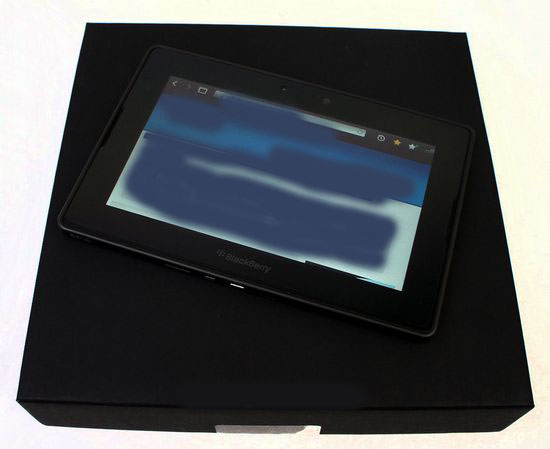
Preview : BlackBerry Playbook


  If you are truly BlackBerry user you must have heard about the Playbook. News of the tablets made ​​by BlackBerry is widely heard on the internet. Until now, this device officially sold only in two countries. This afternoon we got a tablet device that invites many questions among users of Blackberry smartphones this. Yup, BlackBerry Playbook already landed in the office of Loserba Review.

  We get this Blackberry Playbook loan from a friend (whose name is not to be given once the device is still new.) BlackBerry Playbook non warranty is (because it has not officially launched in Indonesia) lent to our review in Loserba Review.


  'BlackBerry Playbook' that came up where we have storage capacity of 64GB. Blackberry Playbook with 64GB capacity this is the Playbook series with the largest capacity. Inside the Playbook BlackBerry sales package, with a black box made ​​of thick cardboard, you will get a manual book with a variety of languages​​, cleaning the screen, charger, USB data cable and Blackberry Playbook itself. It features soft fabric with a black slave. Can not wait to find out how well this 'BlackBerry Playbook'? wait for our next review.


April 15, 2011

'Fast Reboot' : Accelerate Your Android


  Android users often feel annoyed because the device that has suddenly become slow. But, this does not happen because your Android device is damaged. This must happen in all operating systems.

  Android feels faster at first, might be slow because the many programs running in the background. Certainly you can easily finish up with task manager applications built on your Android device. However, not all Android devices have the task manager application. Although there, the Android system is already 'super heavy' because many applications that run in the background will create a task manager built-in feel very hard to follow.


  There is an application that can solve it all. This application is called Fast Reboot. Not as the name suggests, this application does not reboot your Android, but only to stop all applications running in the background, with single tap. With the cessation of all applications in the background, Android will get back to speed, much like it had been on-reboot.


  This application is freeware and you can download and install from the Android Market. Unfortunately, there are 'some Android devices' which not be unresponsive because this application. However, not hurt you to try this application to accelerate the performance of your Android device, without having to reboot.

April 13, 2011

ZTE Light Tablet PC

  ZTE Light is the tablet made ​​by ZTE's first android that has the specification is not inferior to samsung tab or ipad because ZTE Light is already using the Android OS 2.2 or Froyo, and powered by a Qualcomm MSM7227 processor. Light ZTE is also equipped with 7 inch TFT touch screen with a resolution of 800 × 480 pixels, ROM 512MB +512 MB ​​RAM, 3 megapixel camera, FM radio, 802.11b/g/n WiFi, BlueTooth 2.1, GPS, docs to go (Word, Excel , PPT, PDF), and microSD slot up to 32GB. Interestingly ZTE Light is equipped with a SIM card slot, so this tablet can be used to make and receive voice calls. ZTE Light Tablet PC so this could be your alternative to seeking a tablet pc that has a reliable specification for ZTE Light Tablet PC is cheaper than samsung tab. Light ZTE price around U.S. $ 404.27


Spesification Tablet PC ZTE Light :


General Network GSM
Announced 2011, 1Q
Processor Qualcomm MSM7227
SAR Rating
Color Available
Size Dimensions (mm) 192 x 110 x 12.6
Weight (g)
Display Type TFT-LCD WVGA, Capasitive touch screen
Size 7 inches, 800 x 480 pixels
Lines 0
Menu Touchscreen
Design Type Tablet
Antenna Fixed Internal
Keys Navigation Touchscreen
QWERTY No
Soft
Other G-Sensor
Lighting
Memory Phonebook
Internal (MB) 512MB ROM+512MB RAM
Expansion microSD, up to 32GB
Battery Type Standard battery, Li-Ion 3500 mAh
Stand-by (hrs) Up to 500 hours
TalkTime(min)
Ringtones Polyphonic
Customization Yes
Audio Format AAC LC,
MP3 Player Yes
Voice
FM Radio Yes
A2DP Yes
Video Format mpeg4,H.263,H.264
Recorder
TV Null
Entertainment Games Yes
Messaging SMS Yes
Total SMS
MMS No
EMS No
Email Yes, POP3、IMAP4、SMTP
IM
Push-To-Talk
Connectivity HSDPA Yes
EDGE
Bluetooth Yes, v2.1 with A2DP
3G Yes
GPRS Yes
Infrared (IrDA) No
USB Port Yes
WIFI/WLAN Yes, Wi-Fi 802.11 b/g/n
Data Cable Yes
Data Modem
GPS Yes
Software Java (J2ME) No
WAP Not Supported
Platform OS Android OS – v2.2 Froyo
Browser HTML
Predictive Text Entry
Speech Codes
PIM Application
Others Application GPS receiver, Compass, DOCs to go(Word,Excel,PPT,PDF)
Personal Themes No Info.
Caller ID
Profile ID Yes
Camera Lens Type CMOS, 3.0 Megapixel
Digital zoom
Max. Resolution
Flash No
Night Mode No
Multi Shot
Frame Types
Extra Features
Photo Format
Front Camera Yes


April 12, 2011

Logitech Zaggmate: Casing iPad2 with Hidden Keyboard

  Comfort using computers keyboard can not be matched by a virtual keyboard tablet PC, especially when typing long documents. Virtual keyboard also takes some of the display screen. This is quite annoying because the user can not see the document in full. However, purchasing an additional keyboard to the tablet can be cumbersome especially if the users have to carry around when traveling. ZAGG launches Logitech and a casing for an additional keyboard iPad2 who hide in it.

  Cooperate with ZAGG, screen protector manufacturers multiple devices, Logitech introduced a combination of casing and keyboard iPad2 called Logitech Zaggmate. The keyboard in this case is connected to iPad2 by using a Bluetooth connection. When used, the tablet can be set up with a model iPad2 portrait or landscape that resembles a laptop user position. The battery is rechargeable keyboard via a USB cable.

  Logitech Zaggmate casing made ​​of aluminum and is claimed to provide protection of the military class. This casing provides protection along the sides and rear of the screen or iPad2, depending on what parts are hidden behind the aluminum casing of this. If you do not want to use the keyboard, users only need to enter iPad2 with the screen facing up. Products that combine the function of the casing, keyboard, and stand iPad2 is priced at U.S. $ 99.99.

April 11, 2011

Archos 101 Internet Tablet

  Even though such tablets in general, "Archos 101" targeting different market segments as an area of play. Archos is known as a brand that often release products PMP or portable media player that good quality. But this time Archos does not produce such products usually by presenting Tablet based multimedia devices.

  Not only launch products based on a popular operating system (Android), but they also release a tablet that uses Windows, the Archos 101 Internet tablet. This product is one of a series of artificial Archos tablet that uses Android.

  Our first impression of this tablet is fixed on the physical form that slim and lightweight. In our opinion, this is the lightest tablet ever present in our review.

  Dimensions is unique because "Archos 101" using the big screen (widescreen) that is focused to meet the needs of multimedia. Uniquely, this the tablet has a buffer in the back of the body so that when positioned standing, these devices become more like a picture frame. This design is intended to maximize the user experience, for example when watching a video.

 Wide screen has a resolution of 1024x600 with capacitive-type 10.1-inch scale. As the types of capacitive screens, response and accuracy of the screen "Archos 101" of touch is good. Sometimes happens delay (lag) when we touch the screen to access a particular command. It still added perspective and reflections that interfere with the display. Therefore, these the tablet must be positioned correctly to be used comfortably.

  Behind the slim body, Archos 101 strengthened ARM Cortex A8 processor with speed 1 GHz. As is generally the processor type, the performance was enough to run a variety of applications. This processor is combined with the PowerVR SGX 530 as a driving force in terms of graphics. However, for some reason on the test, we found the performance of graphics card is fairly low. And for the size of a PowerVR SGX530, this device should be able to give much better performance.

  We simply deplore its RAM memory capacity of only 256 MB. The number of these including the "just barely" especially when many applications that running in the background. To overcome the system so as not to slow down, we outsmart by installing Task Killer applications. By turning off applications that are not used, the overall performance of the tablet fixed maximum. While 512 MB of available RAM as internal memory that can be used the user to install the application.

  Interestingly, the Archos 101 has a USB port that can recognize the external storage such as flash disks and external hard drive. Our experiments of the USB port is running smoothly, the tablet is able to identify with both flash disk and through its file manager, so that the contents of the flash disk can be read.

  As a multimedia tablet, Archos 101 also not problematic when asked to deliver high-definition content to standard 720p. However, for Full-HD 1080p format, this the tablet rejected by issuing an error message that the resolution is too big.

Testing Results

  As a tablet "Entertainment Your Way", Archos 101 is unique. The design is slim with foot buffer makes it different from other tablet. In general, the performance of tablet is quite good, except for graphics performance. Even so, Archos 101 can still be used for enjoying multimedia content.

 Froyo Android OS combination with fast processors make the overall performance of Archos 101 is good enough. Unfortunately, on the graphics test, performance is somewhat less good.

Examination
Axioo Picopad
Archos 101
Quadrant Advanced Total
453
1082
Quadrant Advanced CPU
668
2474
Quadrant Advanced 3D
264
284
Neocore Benchmark
34.8 fps
1.6 fps


Spesifications Archos 101 Internet Tablet

Processor
ARM Cortex A8 1 GHz
RAM
256 MB
Graphic Card
PowerVR SGX 530
Internal Storage
512 MB
Wireless
WiFi (802.11 b/g/n), Bluetooth
Other
USB Port, Mini HDMI
Display
10,1” 1024x600 piksel
Weight
530 gram
Guarantee
1 Tahun
Situs Web
Extimation Price*
US$ 400

* Concept Two Technology, Feb 2011

Foot Standing
Archos 101 has a foot stand to make it more delicious when used to view video.

Port
A series of ports and buttons on the Archos. Note the presence of a USB port.

Thickness
Archos 101 iPad rival in terms of thickness. But in terms of weight, Archos lighter.


(+) : Unique Design, there is USB port.

(-)  : Performance v less graphic.

April 10, 2011

Axioo Pico Pad, "Taste of Indonesia"

  Axioo Picopad of trying to appear more condensed by pinning one of the distinctive culture of Indonesia into a tablet. What is Indonesian culture that may be incorporated into the tablet?

  Indonesia has many cultures, "Batik" is selected Axioo as a sweetener to give the impression that this tablet "Really Indonesian". Batik Various shades ranging from traditional to modern is set in a digital format that you can use as a front screen wallpaper (homescreen).

  Then we tried one of these Batik wallpaper for display on the homescreen. The results were very harmonious in Picopad screen that has a resolution of 800x480 pixels. With a resolution of it, browsing activities on the internet or reading email is not constrained.

  Physically, display size is 7 inches. In our opinion, the size of it feels right. This makes the overall physical size is ideal. All sides Picopad no plain, because each side has various support tool functionality. On the top you can find the SIM card slot and micro SD / SDHC, and volume buttons. While on the bottom side there is a mic, jack 3.5 mm, mini-USB port and a small button to reset.

  A pair of stereo speakers located on the right and the left (near the Power button) from Picopad. In addition, four main function buttons on the right side in the way the touch screen. Picopad also have two cameras, the main camera of 3MP was behind and another one is in front of VGA camera for video calls.

  Using Froyo (Android 2.2), Picopad running smoothly despite only using the Qualcomm MSM 7227 600 MHz speed. This is quite relief because previously we had was skeptical given another tablet mostly use Qualcomm's Snapdragon with a speed of 1 GHz. Nevertheless MSM 7227 performance here is good enough and during the testing proved to still be able to serve Picopad.

  Picopad have 512 MB ​​of RAM memory. The amount of this size has become a standard tablet of the present to keep the tablets do not slow down as many applications running in the background.

  Picopad have 512 MB ​​of internal storage, but unfortunately the capacity available to users only 172 MB. The amount is very small considering Android users are usually happy to install a variety of interesting applications. But luckily there was support for moving applications to an SD memory card. So applications that already support App2Sd can be moved to the SD Card and do not meet the internal memory.

  I have mentioned above that Picopad have SIM card slots adjacent micro SD slot. This is because Picopad have cellular function that can be used like a cell phone. So no need to worry if you are in a place without Wi-Fi signal. Use only HSDPA data access from the operator.

  Because of shape's factor, the activities of telephone calls should use the handfree / headset. Stereo speakers capable of loud. Mic is also sensitive, so to speak by putting them in the table do not hinder talks.

  Testing Results

  Generally, performance of Axioo Picopad very good. We did not experience significant problems during testing. But one thing we noticed was this device small hassle when faced with applications that demand high graphics performance.

  Although both use Froyo and screen resolution of 800x480, Nexus with a faster processor pulled away Picopad on test performance. But strangely, in the 3D benchmark Neocore, Picopad successfully perform better than Google's handset output is official.

Examination
Axioo Picopad
Google Nexus One
Quadrant Advanced Total
453
1572
Quadrant Advanced CPU
668
5515
Quadrant Advanced 3D
264
315
Neocore Benchmark
34.8 fps
28.5 fps


Spesifications Axioo  Picopad
Processor
Qualcomm MSM 7227 600Mhz
RAM
512 MB
Graphic Card
Adreno 200
Internal Storage
512 MB (172 MB tersedia)
Wireless
802.11b/g WLAN, Bluetooth, A-GPS
Other
Slot SIM card, Kamera
Display
7” 800x480 piksel
Weight
328 gram
Guarantee
1 Tahun
Website
Estimation Price
Rp 4,599,000 (US$460)


Dual Slot
Twin slot is SIM Card slot and Micro SD / SDHC

Reset Button
Picopad emergency button to return to the initial settings

Navigation
The navigation key is  touch button.


(+) : Compact design, functionality, include a leather case.

(-) : Not able to handle graphics work v complex, small internal storage.